The 100 Best Claude Skills
100 verified Claude skills sorted by use case. Start with the 5 that make everything else work better, then find your stack.
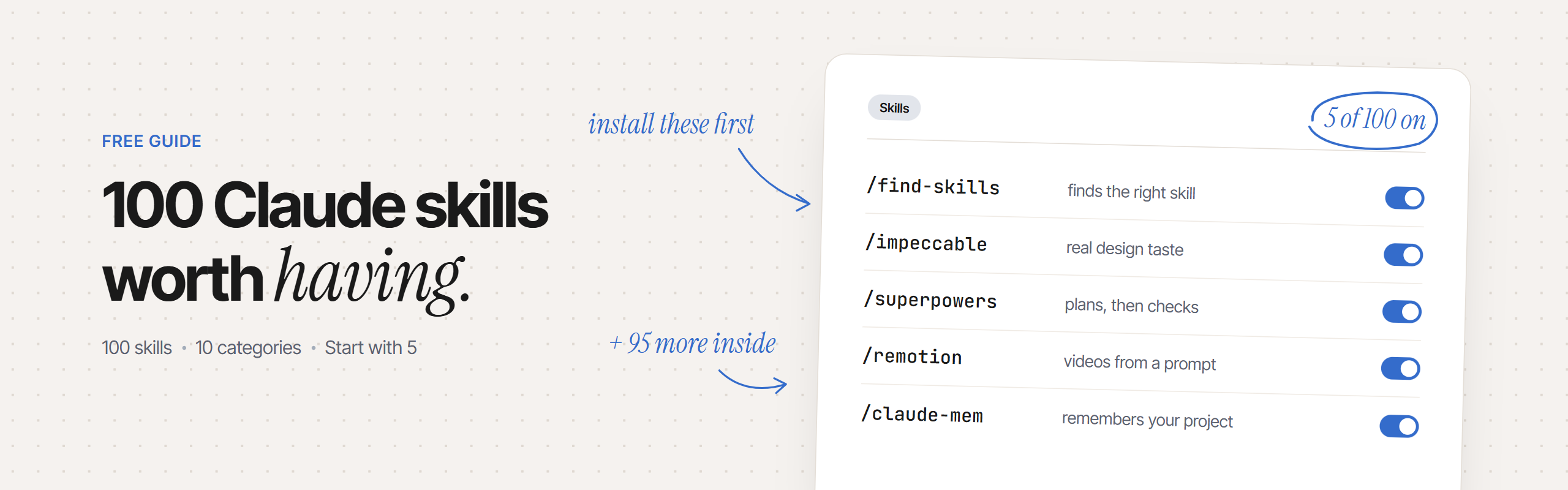
Before you install any other Claude skill, install these 5. They make everything else work better. Then here are 95 more, sorted by what you do.
Gratis, en mi newsletter The AI Path.
How to install skills
A skill is a SKILL.md file that teaches Claude how to do a specific task. You trigger it with a / command, or Claude picks it up automatically when the task fits.
Claude Code (terminal)
- Most community skills install in one command:
npx skills add <org>/<repo> - Official Anthropic skills bundle:
/plugin marketplace add anthropics/skills, then/plugin install <package>@anthropic-agent-skills - Manual install: drop a
SKILL.mdinto~/.claude/skills/<name>/— it activates on the next session - See what you have:
/skillsin any Claude Code session
Claude.ai and Claude Desktop
- Customize → Skills to toggle built-in skills on or off, or upload a ZIP of any skill folder
- Customize → Plugins → Discover for the full plugin marketplace (paid plans only)
- Skills you enable on claude.ai sync automatically to Claude Code v2.1.273+
Plan requirement — bundled skills like /code-review and /debug come free with Claude Code. Community skills from GitHub are free. Plugins from claude.com require a paid plan (Pro, Max, Team, or Enterprise). Enable code execution in your account settings for skills to sync.
Not sure what to install? Use find-skills (#1 below): tell Claude what you're building, and it searches the full registry and installs the right skills for the job.
Community skills are scripts. Before installing a skill from a repo you don't recognize, open its
SKILL.mdand read what it does. Every skill in this list links to a public repo so you can check for yourself.
The 5 you need first
Install these in order. Each one makes the next easier to use.
1. find-skills
You describe what you're building. Claude searches the open skills registry and installs the right tools for the job. No browsing, no guessing.
npx skills add vercel-labs/agent-skillsTry: "I'm building a SaaS app with React and Supabase. Find me the right skills."
2. Impeccable
Turns Claude into a real designer. It steers toward polished, intentional UI decisions and catches "AI slop" before it ships. 24 commands across steer, review, and finish workflows. Maintained by the Impeccable creator with 100k+ stars.
npx impeccable installThen run /impeccable init inside your project to activate it.
Try: "/critique — review this landing page and tell me what looks vibe-coded."
3. Superpowers
Makes Claude stop rushing. It brainstorms first, writes a plan with bite-sized tasks, builds with test-driven development, then reviews before committing. A complete software development methodology in one skill.
/plugin install superpowers@claude-plugins-officialTry: "Build a user authentication flow for my Express app."
4. Remotion
Claude makes real videos from a prompt. 13 specialized skills covering video creation, rendering, maps, captions, and more. Built by the Remotion founder and updated continuously.
npx skills add remotion-dev/skillsTry: "/remotion-create — make a 30-second product demo with our brand colors."
5. claude-mem
Claude remembers your project between sessions. It captures what happened, compresses it with AI, and injects the relevant context into the next session automatically. Works with Claude Code, Codex, and others. Free for 30 days, then use your own API key to keep it free.
npx claude-mem installTry: Open a new Claude Code session the next day. Context loads automatically — no re-explaining.
Design & UI
- ⭐ 6. TypeUI [Community]: 67 design style SKILL.md files, each with a full vocabulary — color palette, type scale, spacing, component rules, and accessibility standards. Pull any style with
npx typeui.sh pull <style>. Try:npx typeui.sh pull neobrutalismto make your UI bold and structural. - 7. Huashu Design [Community]: Generates high-fidelity HTML prototypes, slide decks, motion timelines exported as MP4, and print-ready infographics. Gives Claude three design direction candidates before asking you to choose. Try: "Build a one-page product landing page with three visual direction options."
- 8. frontend-design [Official]: Steers Claude away from generic AI design defaults — warm cream backgrounds, SaaS card kits — and toward custom visual identities grounded in your content. Try: "Design a color palette and type system for a fintech app aimed at Gen Z."
- 9. web-artifacts-builder [Official]: Builds shareable, self-contained web components and artifacts. Try: "Build a reusable card component for our design system with dark mode support."
- 10. theme-factory [Official]: Generates complete design themes with consistent tokens for colors, spacing, and type. Try: "Generate a dark theme that matches our existing brand blue."
- 11. canvas-design [Official]: Canvas-based design work for interactive visual layouts and diagrams. Try: "Create a user flow diagram for our onboarding sequence."
- 12. ai-elements [Community]: Creates chat UI components for the ai-elements library — streaming interfaces, typing indicators, message reactions. Try: "Build a streaming chat interface with message reactions and a typing indicator."
- 13. better-icons [Community]: Searches 200+ Iconify libraries to find the right SVG icon for any use case. Try: "Find 10 icon options for a 'save draft' button from clean, modern libraries."
- 14. prototype [Community]: Builds throwaway UI logic and interface prototypes to settle design questions before committing to a real implementation. Try: "Prototype the interactions for a drag-and-drop file upload zone."
- 15. Design plugin [Official]: Reviews screenshots, writes accessible UX copy, and checks color contrast. Available in the Claude.ai plugin marketplace. Try: "Review this screenshot and flag everything that fails WCAG 2.2 AA."
Install official Anthropic skills (8–11) with:
/plugin marketplace add anthropics/skillsthen/plugin install example-skills@anthropic-agent-skills
Coding & Building Apps
- ⭐ 16. tdd [Community]: Enforces real red-green-refactor. Claude writes a failing test first, makes it pass with the simplest code, then refactors. No skipping steps. Try: "Add a user registration endpoint with full TDD."
- 17. diagnosing-bugs [Community]: A four-step debugging loop — get feedback, form a hypothesis, try a fix, verify it. Stops Claude from randomly changing things. Try: "The login form submits twice on mobile. Let's debug this systematically."
- 18. security-audit [Community]: Scans code for vulnerabilities, exposed secrets, and dependency CVEs. Try: "Run a security audit on my Express API before we deploy."
- 19. test-generator [Community]: Generates unit, integration, and end-to-end tests for existing code. Try: "Generate a full test suite for this payment processing module."
- 20. code-review [Bundled]: Claude Code's built-in review skill. Two-axis review: standards compliance and spec compliance. Trigger it with
/review. Try: "/review — check the last 200 lines before I commit." - 21. simplify [Bundled]: Pre-commit check that catches over-engineering, dead code, and unnecessary complexity. Try: "Simplify this function — I think I've overcomplicated it."
- 22. debug [Bundled]: Step-by-step debugging with structured reasoning. Use as
/debug. Try: "/debug — my tests pass locally but fail in CI." - 23. karpathy-guidelines [Community]: Four principles: think before coding, simplicity first, surgical changes only, goal-driven execution. Install it and it nudges Claude toward these habits automatically. Try: Just install it — it works in the background.
- 24. ponytail [Community]: Applies YAGNI before every feature. Claude checks if existing code or standard libraries already solve the problem. Try: "I want to add real-time notifications." (Claude will suggest the simplest path.)
- 25. code-migration [Community]: Migrates codebases between frameworks, languages, and API versions. Try: "Migrate this class-based React app to hooks and functional components."
- 26. codebase-design [Community]: Deep module design discipline — interfaces, locality, information hiding. Claude thinks about these before writing code. Try: "Review the interface design of our auth module and suggest improvements."
- 27. implement [Community]: Builds work from a written spec using TDD and structured feedback loops. Try: "/implement — execute the spec in SPEC.md for the user settings page."
- 28. improve-codebase-architecture [Community]: Scans your existing codebase for design improvement opportunities — modules that are too big, too coupled, or too opaque. Try: "Scan the /api directory and list the three highest-impact architecture improvements."
Install mattpocock skills (16–17, 23–24, 26–28) with:
claude plugin install mattpocock-skills@claude-plugins-official
Install TerminalSkills entries (18–19, 25) with:npx terminal-skills install <skill-name>
Memory, Context & Workflow
- ⭐ 29. planning-with-files [Community]: File-based planning using three persistent files —
task_plan.md,findings.md, andprogress.md. Claude updates them as it works, so nothing gets lost mid-session. Try: "Use planning-with-files to redesign our checkout flow." - 30. autoresearch [Community]: Goal-directed research with verify loops. Claude sets a goal, researches, checks its work, and iterates until confident. Try: "Research the best authentication strategy for a multi-tenant SaaS app."
- 31. workflow-authoring [Bundled]: Creates dynamic, reusable workflows for multi-step processes. Try: "/workflow-authoring — build a workflow for our weekly code review process."
- 32. loop [Bundled]: Runs any task on a recurring schedule. Try: "/loop 15m — check our test suite and report any new failures."
- 33. batch [Bundled]: Processes multiple files, items, or tasks in a single session. Try: "Batch-translate all JSON locale files in /i18n to Spanish."
- 34. wayfinder [Community]: Plans large projects across multiple sessions. Breaks work into phases, creates handoff notes, and keeps Claude oriented across days of work. Try: "/wayfinder — plan the migration of our monolith to microservices over 6 weeks."
- 35. handoff [Community]: Compresses a long conversation into a compact handoff document so the next session starts informed. Try: "/handoff — summarize today's session so I can pick this up tomorrow."
- 36. grilling [Community]: Relentless clarifying questions about your plan until every assumption is surfaced. Claude auto-triggers this when the brief is incomplete. Try: "I want to add a subscription tier to my app." (Claude will grill you before writing a line.)
- 37. grill-me [Community]: User-invoked version of grilling. Run it when you want Claude to interrogate your own plan before you commit. Try: "/grill-me — I'm thinking of rewriting our backend in Go."
- 38. to-tickets [Community]: Breaks a plan or conversation into concrete, tracer-bullet-sized tickets ready for your issue tracker. Try: "/to-tickets — turn our migration discussion into GitHub issues."
- 39. to-questionnaire [Community]: Converts decisions into structured async questionnaires you can send to teammates. Try: "/to-questionnaire — turn our design decisions into a form for the product team."
- 40. ledger-tasks [Community]: Persistent in-repo task state with Kanban boards. Claude tracks progress in files across sessions without losing context. Try: "Show me everything in progress and what's currently blocked."
Video, Images & Audio
- ⭐ 41. manim-skill [Community]: Claude creates 3Blue1Brown-style animated explainers — narration, text-to-speech, synchronized Manim animation, and final rendered video. No Manim experience needed. Try: "Explain how public-key encryption works as a 2-minute animated video."
- 42. algorithmic-art [Official]: Generates visual art using algorithmic patterns, generative code, and computational aesthetics. Try: "Create a generative art piece using Perlin noise in our brand palette."
- 43. slack-gif-creator [Official]: Creates custom animated GIFs sized for Slack reactions and messages. Try: "Make a 'shipped it' GIF in our brand colors."
- 44. imagegen-frontend-web [Community]: Generates premium reference images for UI work — hero images, product screenshots, and mockup placeholders. Try: "Generate realistic app screenshots for our App Store listing."
- 45. agent-browser [Community]: Browser automation for AI agents. Claude navigates, clicks, fills forms, takes screenshots, and extracts page content. Try: "Screenshot our competitor's pricing page and summarize their tier structure."
- 46. browser-trace [Community]: Captures Chrome DevTools Protocol traces for debugging visual browser interactions and animations. Try: "Capture a trace of the onboarding animation and find where it stutters."
Documents & Files
- ⭐ 47. docx [Official]: Creates and edits Word documents directly from Claude Code. Try: "Write a one-page project brief for our new API and save it as brief.docx."
- 48. pptx [Official]: Builds PowerPoint presentations from a description or outline. Try: "Create a 10-slide investor deck for our SaaS product."
- 49. xlsx [Official]: Creates and edits Excel spreadsheets, including formulas, charts, and pivot tables. Try: "Build a monthly budget tracker with category breakdowns and totals."
- 50. pdf [Official]: Reads, extracts from, and creates PDF files inside Claude Code. Syncs automatically from claude.ai. Try: "Parse this 80-page spec and give me a bullet summary of each section."
- 51. PDF Viewer plugin [Official]: Opens PDFs inside Claude.ai so you can fill them in, annotate, highlight, and add signatures. Try: "Fill in my name and today's date on this contract and add my signature."
- 52. pdf-analyzer [Community]: Extracts text, tables, and structured data from any PDF into usable formats. Try: "Extract all the pricing tables from this 40-page vendor proposal."
- 53. excel-processor [Community]: Reads, transforms, and analyzes Excel and CSV files. Try: "Clean this sales data — remove duplicates, normalize dates, and flag rows missing a customer ID."
- 54. doc-coauthoring [Official]: Collaborative document creation for complex, multi-section documents. Try: "Co-author a technical design doc for our new notification system."
Install official document skills (47–50, 54) with:
/plugin marketplace add anthropics/skillsthen/plugin install document-skills@anthropic-agent-skills
Writing & Content
- ⭐ 55. writing-style-skill [Community]: Teaches Claude your writing style from sample text. Every piece Claude writes after that matches your voice. It learns and updates automatically. Try: "Paste three emails you've written. Ask Claude to write the fourth in your style."
- 56. Brand Voice plugin [Official]: Creates brand guidelines from your website or documents, then rewrites any piece of content in your brand's exact tone. Try: "Upload our homepage copy and create brand guidelines from it."
- 57. internal-comms [Official]: Drafts internal communications with the right tone for company announcements, team updates, and manager messages. Try: "Write a company-wide announcement about our new remote work policy."
- 58. markdown-writer [Community]: Generates clean, well-structured technical documentation with consistent headings, code blocks, and callouts. Try: "Write the full README for this project — setup, usage, and API reference."
- 59. teach [Community]: A multi-session instructional workspace. Claude sets lessons, assigns missions, and tracks what you've learned over time. Try: "Teach me TypeScript generics over 5 sessions."
- 60. writing-for-agents [Community]: Composes documents specifically designed to be read by AI agents — structured, unambiguous, and actionable. Try: "Write a CLAUDE.md for this project that gives Claude everything it needs to work autonomously."
- 61. to-spec [Community]: Converts a conversation or feature discussion into a clean written specification. Try: "/to-spec — turn our search feature discussion into a formal spec."
Research, Data & Analysis
- ⭐ 62. deep-research [Community]: Multi-agent autonomous research. Claude searches, scrapes, writes, and QA-checks in parallel. Returns a professional report with citations in 10–15 minutes. Try: "/research What are the best vector database options for a production RAG app? -deep"
- 63. context7 [Community]: Pulls current, version-specific documentation for any library directly into Claude's context. No more outdated API examples. Install:
npx ctx7 setup --claude. Try: "Show me the latest Drizzle ORM syntax for a join query." - 64. ax [Community]: AI-era curl. Fetches any URL, discovers page structure, and extracts data in any format. Try: "Fetch our competitor's pricing page and return it as structured JSON."
- 65. reverse-engineer-anything [Community]: Investigates compiled or undocumented applications when reading source code isn't enough. Try: "Reverse-engineer how this library calculates pricing tiers from its minified bundle."
- 66. data-visualizer [Community]: Generates charts, graphs, and dashboards from raw datasets. Try: "Turn this monthly sales CSV into a trend chart with annotations for the two best months."
- 67. sql-optimizer [Community]: Analyzes SQL queries and rewrites them for performance — adds indexes, simplifies joins. Try: "This query takes 4 seconds. Find the bottleneck and fix it."
- 68. data-validator [Community]: Validates data quality in CSV, JSON, and database exports — missing fields, wrong types, outliers. Try: "Validate this customer export and flag every row that will break our import script."
- 69. Data plugin [Official]: Turns spreadsheets and CSVs into charts, dashboards, and plain-English answers. Try: "Attach your bank statement and ask: where did my money go this month?"
- 70. prompt-tester [Community]: Tests and evaluates AI prompts with rubrics and test suites. Returns a score and improvement notes. Try: "Test my customer support prompt against 20 edge cases."
- 71. domain-modeling [Community]: Builds and sharpens your project's domain vocabulary into a shared glossary. Reduces miscommunication between Claude and your team over time. Try: "Read the codebase and build a glossary of our domain terms."
DevOps & Infrastructure
- ⭐ 72. docker-helper [Community]: Builds, debugs, and optimizes Docker configurations. Try: "Write a production-ready Dockerfile for my Node.js API with multi-stage builds."
- 73. cicd-pipeline [Community]: Generates and optimizes CI/CD pipelines for GitHub Actions, GitLab CI, and others. Try: "Create a GitHub Actions workflow that tests, builds, and deploys on every push to main."
- 74. log-analyzer [Community]: Analyzes application logs to identify root causes and incident timelines. Try: "Analyze these logs from the 2am outage and give me a root cause timeline."
- 75. monorepo-manager [Community]: Manages dependencies and workspaces in monorepos — Turborepo, Nx, pnpm workspaces. Try: "Audit our monorepo and list packages with conflicting dependency versions."
- 76. api-tester [Community]: Tests REST and GraphQL endpoints with assertions and edge cases. Try: "Test our /auth/login endpoint with valid credentials, bad passwords, and rate limit scenarios."
- 77. webapp-testing [Official]: Playwright-based testing of local web apps. Claude navigates, clicks, takes screenshots, and reads the browser console. Try: "Test the full checkout flow from product page to order confirmation."
- 78. opencli [Community]: Turns any website into CLI commands so agents can interact with it programmatically. Try: "Turn our admin dashboard into CLI commands I can script."
- 79. doctor [Bundled]: Setup checkup that diagnoses Claude Code configuration issues. Try: "/doctor — something feels off with my Claude Code setup."
- 80. run-skill-generator [Bundled]: Teaches
/runand/verifyhow to build and test your specific project type. Run once per new project. Try: "/run-skill-generator — this is a Next.js 15 app with Vitest and Playwright."
Business & Marketing
- ⭐ 81. seog [Community]: Around 90 tools for local SEO — citations, NAP audits, review management, and competitor gap analysis. Try: "Audit our Google Business Profile and list the top 5 ranking issues."
- 82. Marketing plugin [Official]: Writes social posts, plans campaigns, and analyzes channel performance. Try: "Write a week of LinkedIn posts from our latest product update."
- 83. Sales plugin [Official]: Researches companies before calls, drafts personalized outreach, and plans deal strategies. Try: "Research Acme Corp before my call tomorrow and draft three talking points."
- 84. Finance plugin [Official]: Builds P&Ls, reconciles bank statements, and explains budget variances in plain language. Try: "Build a monthly P&L from these figures and explain why costs went over."
- 85. Legal plugin [Official]: Reviews contracts, triages NDAs, and summarizes agreements in plain language. Try: "Flag risky clauses in this vendor contract and explain each one simply."
- 86. Productivity plugin [Official]: Manages tasks, plans your day, and finds to-dos buried in your notes and emails. Try: "Here are my notes from this week — organize them into a prioritized task list."
- 87. HR plugin [Official]: Supports hiring, onboarding, performance reviews, and HR communications. Try: "Write a job description for a senior backend engineer focused on distributed systems."
- 88. sequenzy-email-marketing [Community]: Manages email campaigns, subscribers, segments, and sequences via the Sequenzy platform. Try: "Create a 5-email onboarding sequence for new trial users."
- 89. brand-guidelines [Official]: Creates and maintains brand identity rules from your existing materials — logo, colors, tone, and messaging. Try: "Read our website and create a brand guidelines document."
- 90. discernment-nudge [Official]: After any substantive answer, Claude adds 2–3 specific questions to surface hidden assumptions and gaps. Triggers once per conversation, never nags. Try: Just install it — it makes Claude more careful with estimates and recommendations automatically.
Make Your Own Skills
- ⭐ 91. skill-creator [Official]: The official Anthropic skill-builder. Describe a task you repeat, and Claude scaffolds a complete SKILL.md file ready to install. See the next section for how to use it. Try: "/skill-creator — I want to automate my weekly standup notes."
- 92. Plugin Create [Official]: Builds full Claude plugins from Anthropic templates — connectors, sub-agents, and custom skill commands. Try: "Build a plugin that connects Claude to our internal Notion workspace."
- 93. mcp-builder [Official]: Guides you through creating a Model Context Protocol server in Python or TypeScript — research, build, test, and evaluate in 4 phases. Try: "Build an MCP server that connects Claude to our PostgreSQL database."
- 94. agent-workflow-packager [Community]: Converts any repeated Claude Code workflow into a reusable skill package. Try: "I always run these 5 steps before deploying. Turn them into a /pre-deploy skill."
- 95. agnix [Community]: A linter and LSP for CLAUDE.md, AGENTS.md, and SKILL.md files. Catches syntax errors, broken references, and formatting issues before you install. Try: "Run agnix on my ~/.claude/skills directory and show me what needs fixing."
- 96. wizard [Community]: Generates interactive Bash setup wizards — guided installers that ask questions and configure your project. Try: "Write an interactive setup wizard for onboarding new developers to this repo."
- 97. implement-spec [Community]: Executes full specs using concurrent subagents — multiple Claude instances working in parallel on different parts of the work. Try: "/implement-spec SPEC.md — run this with 4 concurrent agents."
- 98. retro [Community]: Suggests concrete improvements to your Claude Code setup based on what slowed you down in recent sessions. Try: "/retro — what should we change about how we're using Claude on this project?"
- 99. triage [Community]: Moves issues through structured triage states with clear acceptance criteria at each stage. Try: "Triage our backlog — sort these 40 issues into must-have, should-have, and won't-do."
- 100. academy-guide [Official]: Automatically surfaces the right Claude Academy course or tutorial when you ask a how-to question about Claude. Two links max, only when there's a strong match. Try: Just install it — it enriches any learning-focused conversation automatically.
Build a skill in 2 minutes
Any task you do more than twice is worth turning into a skill. Install skill-creator (#91) and run this prompt:
/skill-creator

Task I want to automate: [describe what you do manually]

What Claude should do each time:
1. [step 1]
2. [step 2]
3. [step 3]

Expected output: [what you want back]
Trigger it with: /[name]
Three skills worth building right now:
- /weekly-review: You paste bullet notes from your week. Claude formats them into a clean action list with three priorities for next week.
- /my-voice: You share three pieces of content you wrote. Claude uses them as a style guide for every future email, post, or doc it writes for you.
- /project-brief: Claude reads your repo's README and open issues, then writes a one-paragraph context summary — paste it at the top of any new session.
Starter packs
Install by what you do, not by what sounds useful.
- If you build apps: Superpowers (#3) + tdd (#16) + security-audit (#18) + test-generator (#19) + claude-mem (#5)
- If you create content: writing-style-skill (#55) + deep-research (#62) + Remotion (#4) + Brand Voice plugin (#56) + manim-skill (#41)
- If you design UIs: Impeccable (#2) + TypeUI (#6) + Huashu Design (#7) + frontend-design (#8) + better-icons (#13)
- If you do marketing: seog (#81) + Marketing plugin (#82) + Brand Voice plugin (#56) + writing-style-skill (#55) + data-visualizer (#66)
- If you work in an office: docx (#47) + xlsx (#49) + pptx (#48) + PDF Viewer plugin (#51) + deep-research (#62)
Start with the 5 from the top of this guide. Add 3 from the section that matches what you do. You don't need all 100. You need the right 8.